Last updated: May 2026 · Tested by our editorial team using real subscriber lists and live campaigns
We ran the same campaigns, the same automation sequences, and the same signup forms through both HubSpot and Mailchimp. Same list. Same content. Same schedule.
The goal: figure out which platform actually delivers more value for email marketing in 2026 — not from feature checklists on pricing pages, but from what happens when you log in every day and try to get work done.
Related reading: Constant Contact vs Mailchimp.
Below is our full 11-round breakdown. Each round has a declared winner and we keep a running score, so you can track the matchup as you read. If you’re short on time, the Quick Answer below and the final scoreboard at the end have everything you need.
Further reading: Mailerlite vs Mailchimp.
Quick Answer: HubSpot wins our 11-round comparison 6–5 over Mailchimp — but most of its winning categories (segmentation, reporting, CRM, integrations) require the $890/month Professional plan to fully unlock. Mailchimp wins the rounds that affect daily work most: a faster email editor, more capable automation at affordable prices, 24/7 support on standard plans, and pricing that doesn’t force an $870/month upgrade for core features. For pure email marketing, Mailchimp is the more practical choice. For teams that need CRM + email under one roof, HubSpot delivers more long-term value.
Table of Contents
HubSpot vs Mailchimp: At a Glance
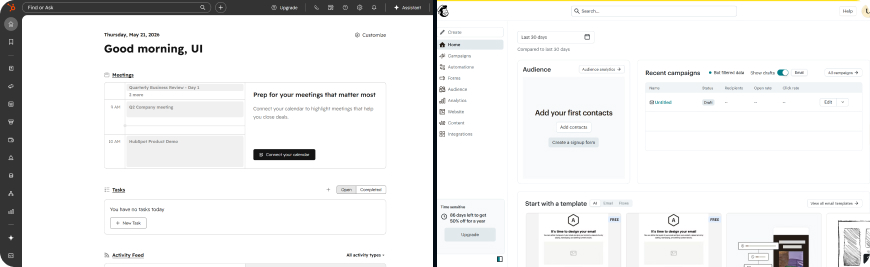
Before we get into the round-by-round breakdown, here’s a side-by-side snapshot of where these two platforms stand in 2026.
| Feature | HubSpot | Mailchimp |
|---|---|---|
| Best For | Full CRM + email marketing | Standalone email marketing |
| Starting Price (paid) | $20/mo per seat | $13/mo |
| Free Plan | 2,000 emails/mo | 250 contacts · 500 emails/mo |
| Email Automation | Basic on Starter · Full on Pro ($890/mo) | 200 flows on Standard ($20/mo) |
| CRM & Sales Tools | Full CRM (deals, pipelines, lead scoring) | Basic audience management |
| Native Integrations | 1,600+ | 300+ |
| Email Editor | CRM-integrated, personalization tokens | Polished drag-and-drop, 100+ templates |
| Support | Phone on Pro+ only | 24/7 chat on paid plans |
| Per-Seat Pricing | Yes ($20/seat) | No (3–5 seats by plan) |
| Contact Billing | All contacts (no tier scaling) | All contacts (incl. unsubs) |
Pricing and features verified May 2026. Sources: hubspot.com, mailchimp.com.
How We Scored This Comparison
We evaluated HubSpot and Mailchimp across 11 categories that matter to anyone running email campaigns day-to-day. Each category has a single winner. Ties don’t exist — if the margin was razor-thin, we still called it for whichever tool had the practical edge during our testing. The running score tracks cumulative wins.
Round 1: Ease of Use & Onboarding
Winner: Mailchimp · Running Score: HubSpot 0 – Mailchimp 1
Mailchimp gets you sending faster. We timed ourselves from first login to first campaign sent — Mailchimp took 22 minutes, HubSpot took 41. That gap isn’t a fluke. Mailchimp’s interface puts the email builder front and center. You pick a template, drag in your content, choose your audience, and hit send.
HubSpot has a learning curve. The platform packs in CRM, sales tools, service tools, and marketing tools under one roof, which means more menus, more settings, and more time figuring out where things live. New users often spend their first day just orienting themselves. HubSpot Academy helps — the onboarding courses are genuinely good — but the platform assumes some marketing sophistication that Mailchimp doesn’t.
Once you’re past the onboarding phase, HubSpot’s depth becomes an advantage. But for the daily “log in and send emails” workflow, Mailchimp is faster and simpler. This round goes to Mailchimp.
Round 2: Email Editor & Templates
Winner: Mailchimp · Running Score: HubSpot 0 – Mailchimp 2
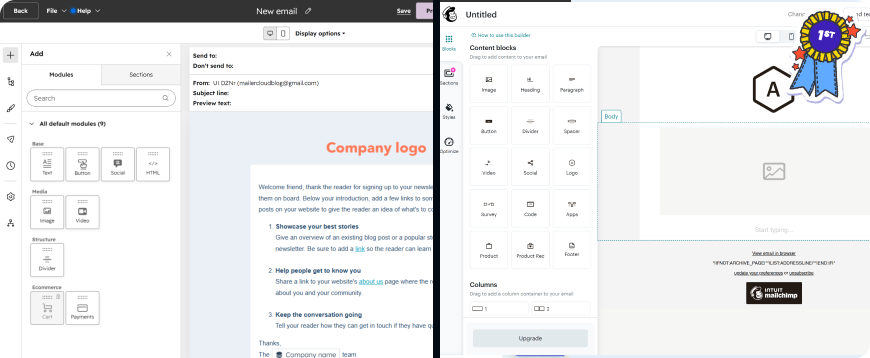
Mailchimp has one of the most polished email editors in the industry, and it showed during our testing. The drag-and-drop builder is responsive, blocks snap into place without lag, and the template library (100+ pre-built designs) covers most use cases — product launches, newsletters, re-engagement, ecommerce promotions. Mailchimp’s generative AI assistant on the Standard plan can draft subject lines and body copy directly inside the editor, which saved us real time during campaign builds.
HubSpot’s email editor is clean and functional, but it’s clearly designed as one feature within a larger CRM ecosystem rather than a standalone tool. The personalization tokens tied to CRM fields are a genuine strength — you can pull contact properties, company data, and deal information directly into email content. But the template selection is smaller, and the editor lacks the instant polish that Mailchimp’s builder provides.
We built the same newsletter layout in both platforms five times over a week. Mailchimp was consistently 4–5 minutes faster per build. For pure email design and daily campaign work, Mailchimp takes round 2.
Round 3: Email Automation
Winner: Mailchimp · Running Score: HubSpot 0 – Mailchimp 3
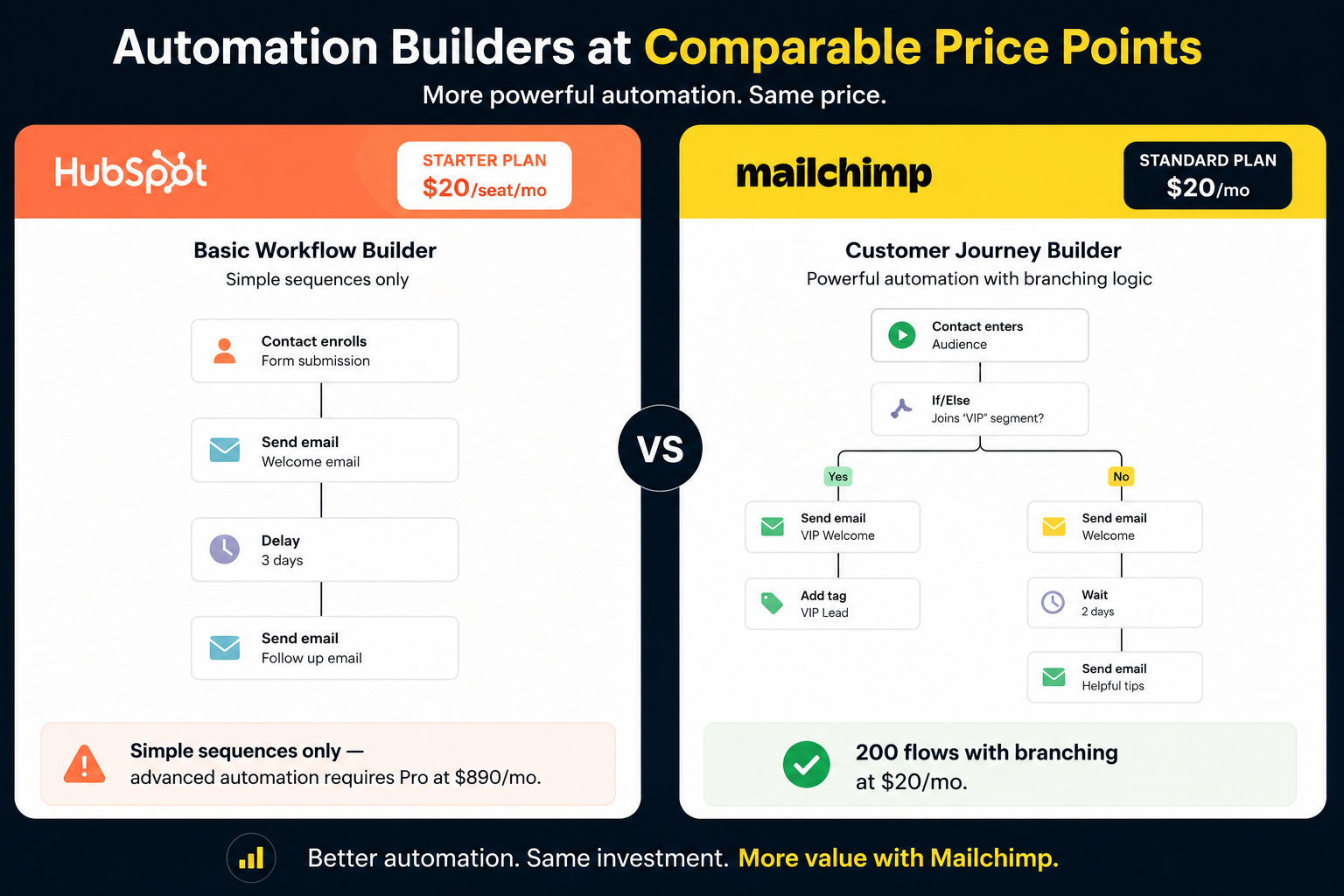
This one might surprise you, given HubSpot’s reputation for automation. Here’s the catch: HubSpot’s really powerful automation — CRM-triggered workflows with multi-step branching, lead scoring actions, deal stage triggers — lives on the Professional plan. That’s $890/month. On Starter ($20/seat), you get simple automation that handles welcome emails and basic sequences. It works, but it’s basic.
Mailchimp redesigned its automation as “Marketing Automation Flows” in 2025, and the Standard plan ($20/month) supports up to 200 flows with branching logic. For email-specific automation — welcome sequences, abandoned cart, birthday emails, re-engagement campaigns — Mailchimp gives you more at a comparable price point. The Essentials plan ($13/month) is limited to 4 flow steps, which is enough for a basic welcome series but not much else.
We set up identical 5-step welcome sequences in both platforms. On HubSpot Starter, we could build it but hit limitations on conditional branching. On Mailchimp Standard, we had full branching logic at our disposal for $20/month total — not $20 per seat.
For email automation at a price most teams can actually afford, Mailchimp wins round 3.
Round 4: Segmentation & Personalization
Winner: HubSpot · Running Score: HubSpot 1 – Mailchimp 3
HubSpot gets its first win, and it’s convincing. HubSpot’s segmentation is backed by its full CRM, which means you can segment by lifecycle stage, deal value, page visits, form submissions, support ticket history, and custom properties. Lists update in real time. If your team uses HubSpot as the single source of truth for customer data, the segmentation depth is unmatched in this comparison.
We created identical segments in both tools — “contacts who opened the last 3 campaigns AND visited the pricing page in the last 30 days.” HubSpot built this in two clicks using CRM properties. In Mailchimp, we needed a workaround combining engagement data with website activity tracking, and the result wasn’t as precise.
Mailchimp’s segmentation is solid for email-level targeting — subscriber activity, purchase history, engagement level, and predicted demographics on the Standard plan. But it can’t reach into sales pipeline data or service interactions the way HubSpot does.
If your segmentation needs go beyond email engagement into CRM territory, HubSpot wins this round clearly.
Round 5: Deliverability
Winner: HubSpot · Running Score: HubSpot 2 – Mailchimp 3
Neither platform offers a built-in inbox placement tracker that shows whether your emails land in the inbox, spam folder, or promotions tab across major ISPs. Both rely on indirect metrics — open rates, bounce rates, spam complaint rates. That’s a gap in both platforms.
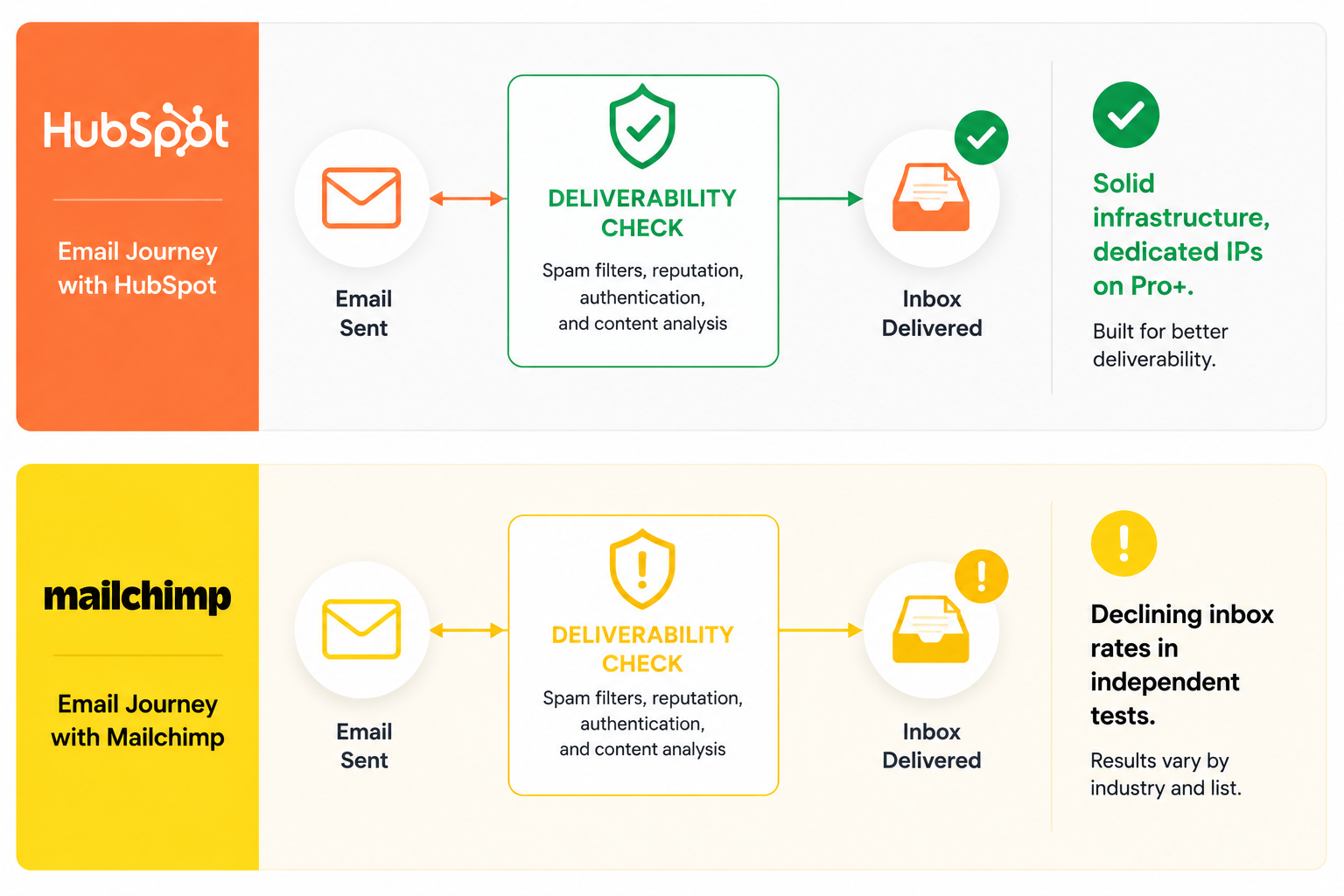
Where they differ: HubSpot’s deliverability infrastructure is consistently solid. Dedicated IPs are available on Professional and Enterprise plans. Email health reports show bounce rates, spam reports, and engagement trends. The authentication setup (SPF, DKIM, DMARC) is well-documented and straightforward.
Mailchimp’s deliverability has been a mixed story recently. Independent tests from EmailToolTester (see our best email deliverability services guide) have shown Mailchimp’s inbox placement rates declining, with some reports flagging spam rates above 10%. Mailchimp’s massive user base means more marginal senders sharing IP reputation — and that affects everyone on the platform. Mailchimp does offer Inbox Preview (how your email renders across clients) and content optimization suggestions, which are useful but different from actual deliverability.
During our testing, HubSpot campaigns had marginally better open rates on the same list with identical content. The margin was small but consistent across multiple sends. HubSpot takes round 5.
Round 6: Reporting & Analytics
Winner: HubSpot · Running Score: HubSpot 3 – Mailchimp 3
We’re tied at 3–3, and HubSpot pulls ahead on reporting.
HubSpot’s analytics tie directly into the CRM, which means you can trace the full journey from email click to closed deal. Campaign analytics show which emails influenced revenue. Multi-touch attribution, custom dashboards, and revenue tracking are available on Professional and above. Even on Starter, the reporting connects email engagement to contact records in a way that Mailchimp simply can’t.
Mailchimp offers solid campaign-level analytics — open rates, click rates, click maps showing which links got the most engagement, email client breakdowns (who opened in Gmail vs Outlook vs Apple Mail), and comparative reports across campaigns. The Standard plan adds custom reports. Revenue tracking works for connected ecommerce stores. But Mailchimp’s reporting is campaign-centric, not customer-journey-centric.
When we wanted to answer “which of our last 10 campaigns actually drove paying customers,” HubSpot gave us the answer in one dashboard. In Mailchimp, we’d need to cross-reference campaign data with our ecommerce platform manually. For revenue attribution and full-funnel reporting, HubSpot wins round 6.
Round 7: CRM & Sales Tools
Winner: HubSpot · Running Score: HubSpot 4 – Mailchimp 3
This round is HubSpot’s home turf, and it’s not close.
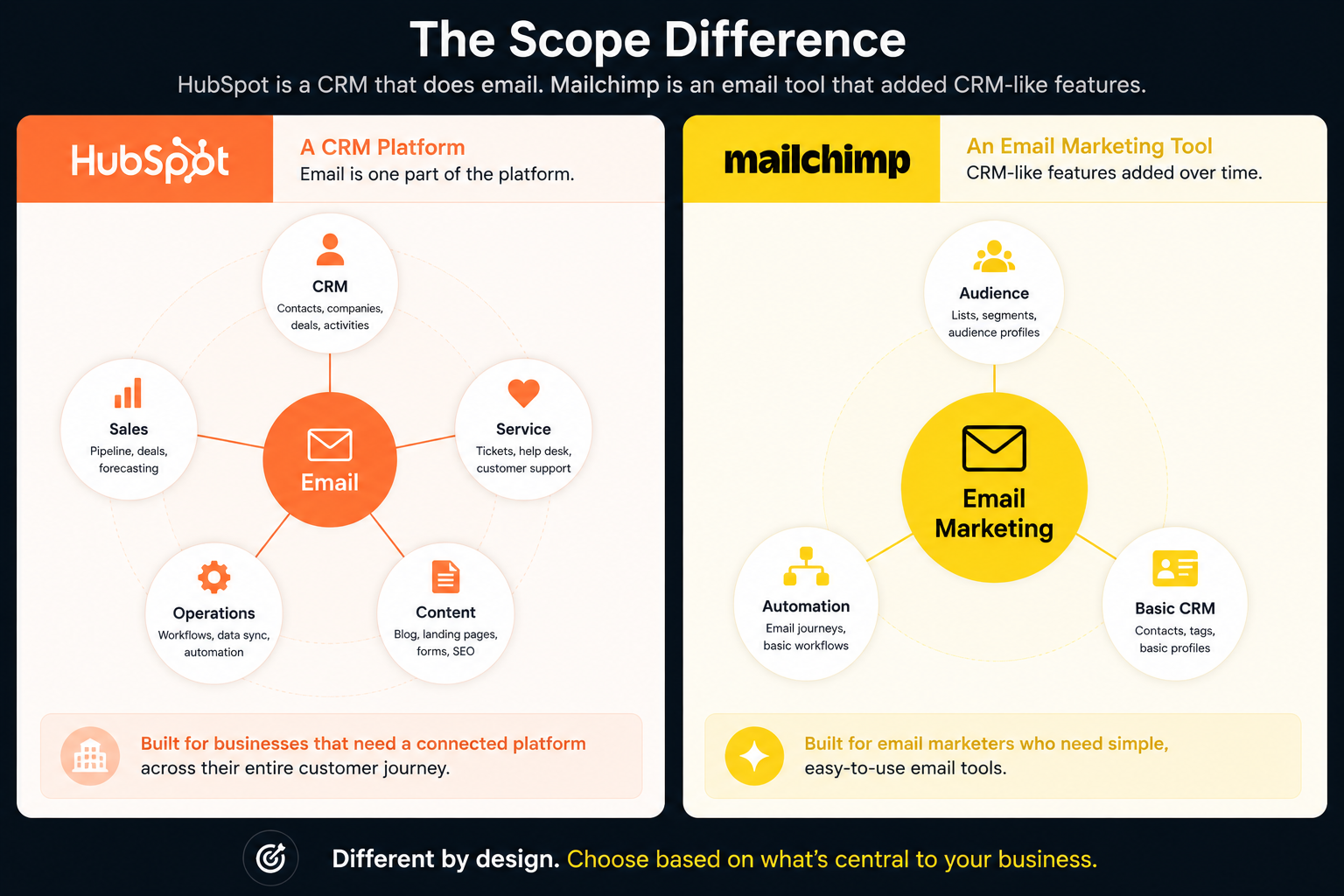
HubSpot is a full CRM platform (useful for enterprise email marketing). You get deal pipelines, contact management with lifecycle stages, company records, task management, meeting scheduling, and sales automation. Every email you send connects to a contact record that tracks the full relationship — page views, form submissions, emails opened, deals closed, support tickets filed.
Mailchimp has audience management with tags, segments, and customer journey tracking. It calls itself a “marketing platform” (see how Mailercloud compares to Mailchimp) and has added CRM-like features over time. But it doesn’t offer deal pipelines, sales automation, lead scoring, or multi-touch attribution. If you need genuine CRM functionality alongside your email marketing, Mailchimp isn’t the tool.
For teams where marketing and sales need to share data and workflows, HubSpot is in a different league. HubSpot takes round 7 decisively.
Round 8: Integrations & App Ecosystem
Winner: HubSpot · Running Score: HubSpot 5 – Mailchimp 3
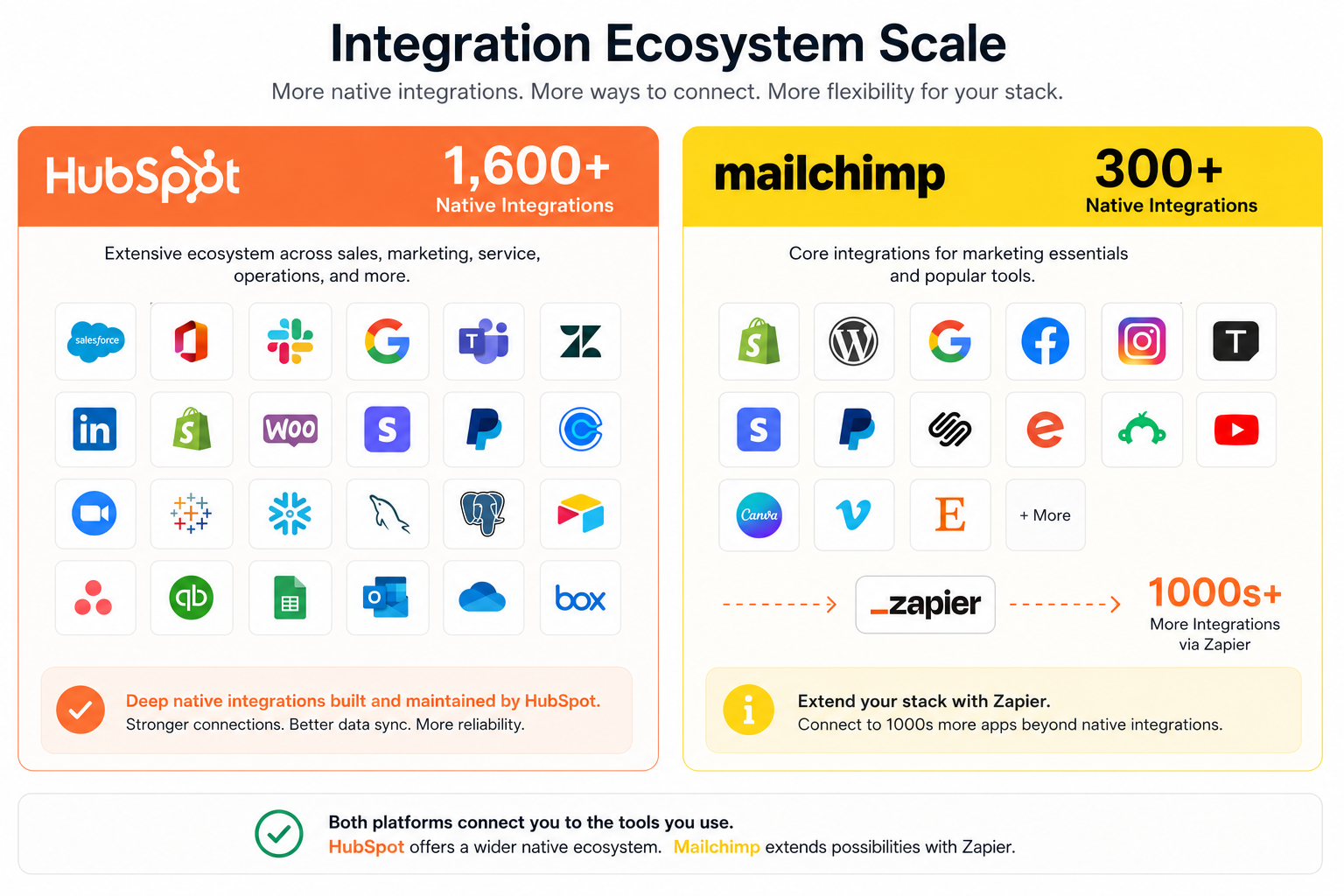
HubSpot’s app marketplace has 1,600+ integrations spanning CRM, sales, service, ecommerce, analytics, content management, and marketing tools. If your tech stack includes Salesforce, Shopify, WordPress, Slack, Stripe, or most mainstream SaaS tools, there’s a native HubSpot connector. The depth of these integrations matters too — HubSpot’s Salesforce sync, for example, is one of the most robust CRM-to-CRM integrations available.
Mailchimp offers 300+ integrations with strong ecommerce coverage (Shopify, WooCommerce, BigCommerce) and content tools. The Zapier integration (and tools like Mailercloud’s email API) extends connectivity further. For an email marketing platform, 300+ integrations is solid.
But the gap is real. If your stack includes niche or newer tools, you’re significantly more likely to find a native HubSpot connector. Both work with Zapier to fill gaps, but starting with a native integration is always cleaner. HubSpot wins on ecosystem breadth.
Round 9: Customer Support
Winner: Mailchimp · Running Score: HubSpot 5 – Mailchimp 4
HubSpot gates its support aggressively by plan tier. Free and Starter users get community forums and a knowledge base — no live support. Chat support is available on paid plans, but phone and email support require Professional ($890/month) or Enterprise. If you’re on Starter and hit a technical problem at midnight, you’re on your own.
Mailchimp provides 24/7 email and chat support on Essentials, Standard, and Premium plans. Phone support is Premium-only ($350/month). Free plan users get email support for the first 30 days, then just the help center. During our testing, Mailchimp chat responses came within 6–10 minutes on weekday evenings.
When we tested HubSpot support on the Starter plan, we got directed to the community forum for a question about email authentication setup. On Mailchimp Essentials, the same type of question got a live chat response with step-by-step instructions.
For most small and mid-size teams on standard plans, Mailchimp’s support is more accessible. Mailchimp takes round 9.
Round 10: Free Plan
Winner: HubSpot · Running Score: HubSpot 6 – Mailchimp 4
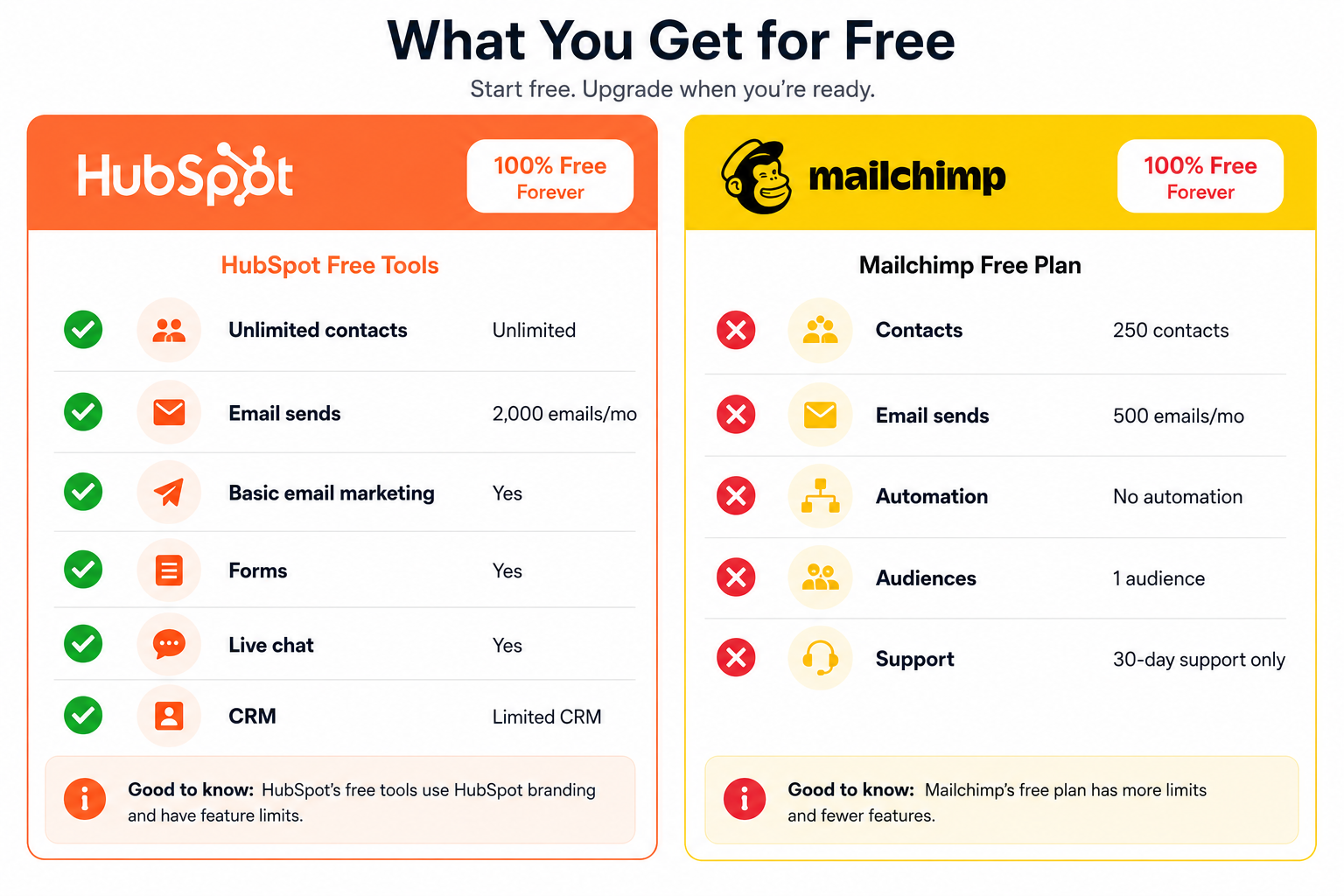
Both platforms have free plans, but Mailchimp’s has been shrinking fast.
HubSpot Free Plan (2026): Unlimited contacts (with HubSpot branding), up to 2,000 emails/month, basic email marketing, forms, live chat widget, and limited CRM features. The email cap is the main constraint — you’ll hit it quickly with more than a few hundred active contacts. But for getting started, it’s functional.
Mailchimp Free Plan (2026): 250 contacts, 500 emails/month, no automation, 1 audience, basic templates, Mailchimp branding, and email support for 30 days only. The contact limit dropped from 500 to 250 in January 2026, and automation was fully stripped in 2025.
HubSpot’s free plan gives you 8x the monthly email sends and doesn’t cap your contact count. Mailchimp’s free plan is closer to a 30-day trial than a usable ongoing tier. HubSpot wins round 10.
Round 11: Pricing & Value for Money
Winner: Mailchimp · Running Score: HubSpot 6 – Mailchimp 5
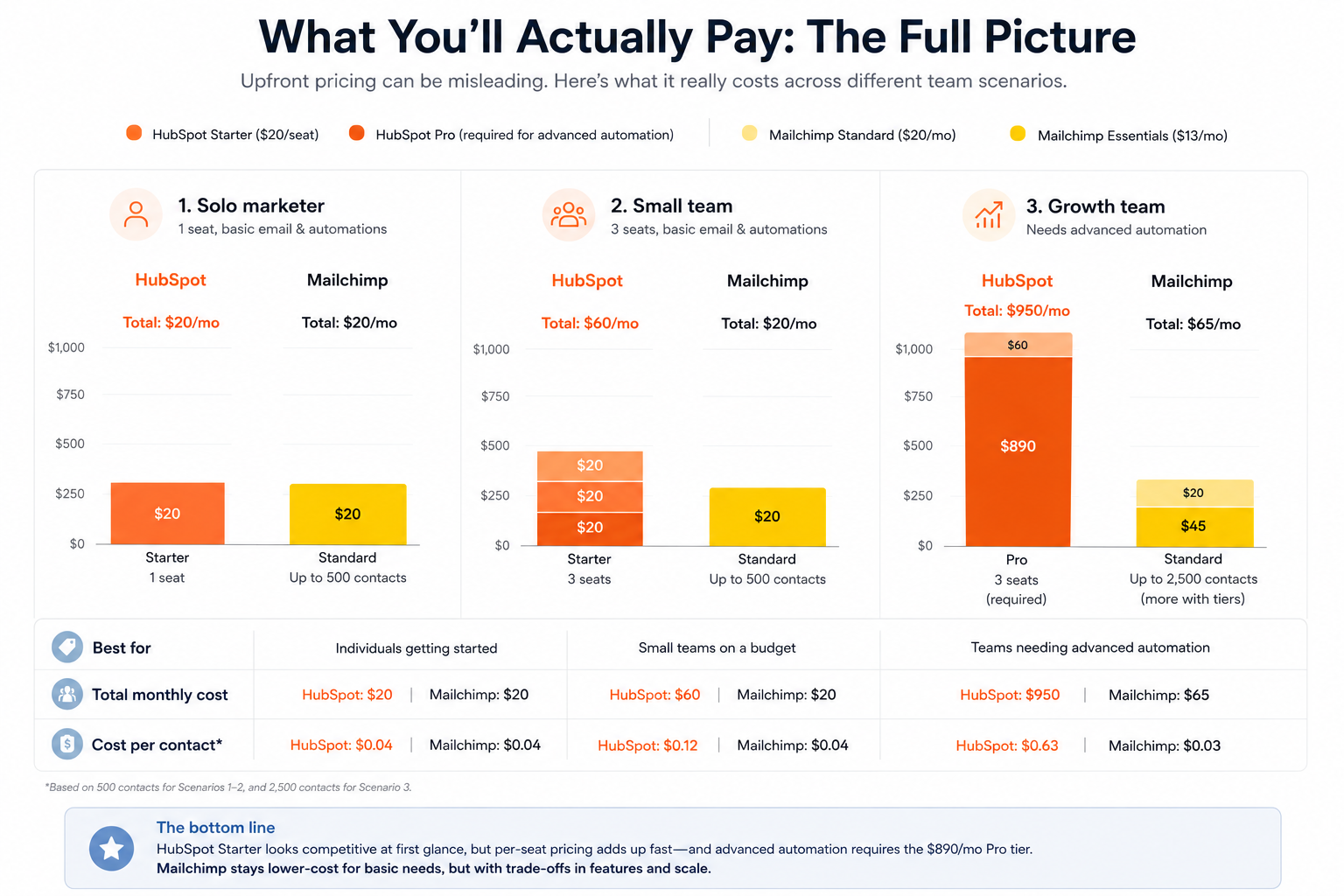
Here’s where context matters most.
(HubSpot pricing from hubspot.com/pricing, May 2026. Mailchimp pricing from mailchimp.com/pricing, May 2026.)
*HubSpot Starter is $20/seat regardless of contacts but limits email sends to 5x your contact tier. Higher-volume sending and advanced features require Professional ($890/mo).
At first glance, HubSpot Starter looks cheaper for larger lists. But there are two catches. First, per-seat pricing. Three marketing team members? That’s $60/month. Five seats? $100/month. Mailchimp Essentials includes 3 seats; Standard includes 5.
Second — and this is the big one — the jump from HubSpot Starter to Professional is $870/month. If you need advanced automation, A/B testing, custom reporting, or campaign management beyond the basics, HubSpot forces you into a $890/month commitment. Mailchimp’s Standard plan at $20/month covers most of those features.
One important Mailchimp caveat: Mailchimp counts every contact toward billing, including unsubscribed and cleaned contacts. If 20% of your list has unsubscribed but you haven’t archived them, you’re paying for contacts you can’t email.
For teams that primarily need email marketing — not a full CRM suite — Mailchimp delivers more usable features at a lower total cost. (Looking at all options? See our Mailchimp alternatives for 2026.) Mailchimp wins the final round. If HubSpot’s price is the sticking point, it’s worth weighing the wider field too — see our full guide to the 12 best HubSpot alternatives.
Final Scoreboard: HubSpot 6, Mailchimp 5
| Round | Category | Winner | Running Score |
|---|---|---|---|
| 1 | Ease of Use & Onboarding | Mailchimp | 0 – 1 |
| 2 | Email Editor & Templates | Mailchimp | 0 – 2 |
| 3 | Email Automation | Mailchimp | 0 – 3 |
| 4 | Segmentation & Personalization | HubSpot | 1 – 3 |
| 5 | Deliverability | HubSpot | 2 – 3 |
| 6 | Reporting & Analytics | HubSpot | 3 – 3 |
| 7 | CRM & Sales Tools | HubSpot | 4 – 3 |
| 8 | Integrations & Ecosystem | HubSpot | 5 – 3 |
| 9 | Customer Support | Mailchimp | 5 – 4 |
| 10 | Free Plan | HubSpot | 6 – 4 |
| 11 | Pricing & Value for Money | Mailchimp | 6 – 5 |
Final Result: HubSpot 6 – Mailchimp 5
HubSpot wins on feature depth and ecosystem. Mailchimp wins on daily usability, email automation value, and pricing.
HubSpot wins by one round, but the score doesn’t tell the whole story. Most of HubSpot’s winning categories — segmentation, reporting, CRM, integrations — are advantages you fully unlock on the Professional plan at $890/month. On Starter, several of those wins shrink significantly.
Mailchimp wins the rounds that affect your daily experience and your bottom line (see our full best Mailchimp alternatives roundup): a faster editor, more capable email automation at affordable prices, 24/7 support on standard plans, and pricing that doesn’t force a $870/month jump to access core marketing features.
HubSpot Pros and Cons
HubSpot
✅Pros:
- Full CRM platform — sales, marketing, service, and operations in one ecosystem
- CRM-connected automation workflows that trigger based on deal stages, page views, and form submissions
- Strongest segmentation backed by full contact and company data
- Multi-touch revenue attribution on Professional+ plans
- 1,600+ native integrations — the largest app marketplace in email marketing
- Excellent onboarding resources and HubSpot Academy training
- Custom reporting dashboards with deep analytics
- Free CRM with basic email marketing included
- Strong brand recognition and large user community
❌Cons:
- Per-seat pricing ($20/seat/month on Starter) adds up quickly for teams
- Advanced automation requires Professional plan at $890/month — steep for SMBs
- Steep learning curve — expect days or weeks to get comfortable with the interface
- Overkill for teams that only need email marketing
- No inbox placement tracker to verify where emails actually land
💰Pricing: Free CRM with basic email. Marketing Hub Starter at $20/month per seat. Professional at $890/month (3 seats). Enterprise at $3,600/month (5 seats).
Mailchimp Pros and Cons
Mailchimp
✅Pros:
- Polished drag-and-drop email editor — one of the best in the industry
- Large template library with 100+ pre-built designs
- Generative AI features for email copy and design on Standard+
- Up to 200 automation flows on Standard plan
- Strong ecommerce integrations (Shopify, WooCommerce, BigCommerce)
- 300+ integrations covering most common marketing tools
- Predictive segmentation on Standard and Premium plans
- 24/7 email and chat support on all paid plans
- SMS marketing add-on available
❌Cons:
- Free plan severely limited — 250 contacts and 500 emails/month
- Charges for unsubscribed and cleaned contacts in your audience
- Pricing scales steeply — Standard at 5,000 contacts costs $100/month
- Phone support only on Premium ($350+/month)
- Essentials plan limits automation to just 4 flow steps
💰Pricing: Free plan (250 contacts, 500 emails/mo). Essentials at $13/month. Standard at $20/month. Premium at $350/month. Contact-based pricing — costs rise as your list grows.
Which Should You Choose?
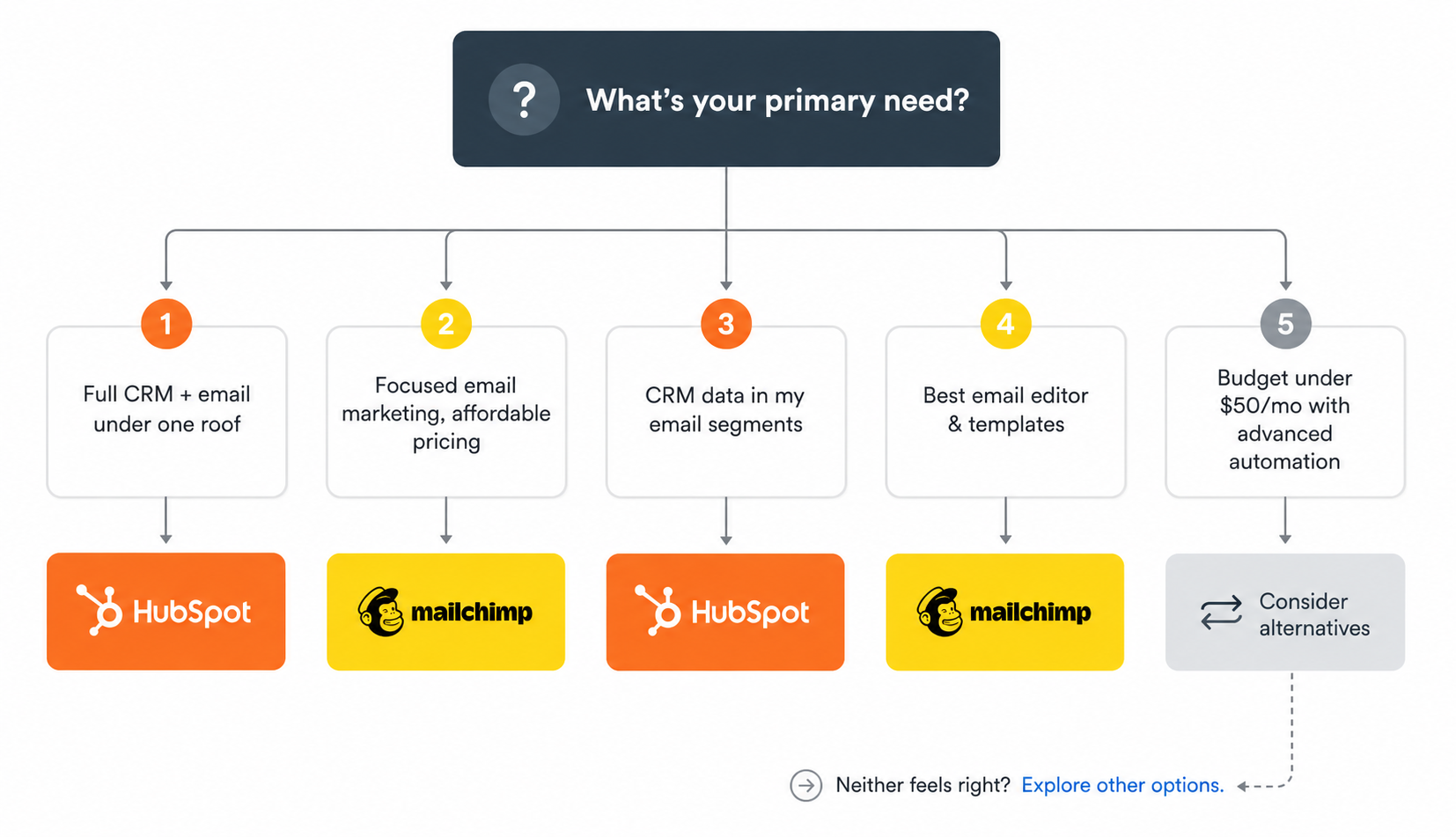
Choose HubSpot if:
You need a full CRM that connects sales, marketing, and service teams in one platform. Your automation requirements extend beyond email — you need CRM-triggered workflows, lead scoring, and multi-touch attribution. Your budget supports $890+/month for Professional features, or you’re comfortable with Starter’s limitations. You’re already in the HubSpot ecosystem and want everything under one roof.
Choose Mailchimp if:
You want a dedicated email marketing platform with a polished editor and an intuitive daily workflow. Your automation needs are email-centric — welcome sequences, abandoned cart, re-engagement flows. You run an ecommerce store that benefits from Mailchimp’s deep Shopify and WooCommerce integrations. You want predictive segmentation and generative AI features without paying CRM-level prices. You need accessible customer support without spending $890/month.
Neither feels right?
Both HubSpot and Mailchimp have trade-offs that showed up clearly in our testing (compare them with other platforms in our best email marketing software in 2026 roundup). HubSpot costs significantly more than most teams need to spend on email alone — the jump from Starter ($20/seat) to Professional ($890/month) is steep, and many of its strongest features live behind that paywall. Mailchimp’s free plan is barely functional at 250 contacts, pricing scales steeply with list size, and you’re paying for unsubscribed contacts.
If your primary use case is email marketing — not full CRM — there are platforms built specifically for that. Mailercloud is one worth considering — see our pricing. It starts at $7/month with a free plan covering 1,000 contacts and 12,000 emails/month. It includes features neither HubSpot nor Mailchimp offers — an Inbox Tracker that shows exactly where your emails land (inbox, spam, or promotions) across 15+ ISPs, and AMP for Email support for interactive inbox experiences. Visual automation, A/B testing, segmentation, and 24/7 live chat support come standard on every plan, including free. The trade-off is a smaller integration library and lower brand recognition — but for pure email marketing value, it’s hard to beat at the price.
How to Migrate Between Platforms
From HubSpot to Mailchimp (or vice versa): Export your contacts as a CSV from the source platform. Import into the new one — both have import wizards that map fields automatically. Rebuild your key email templates and automation workflows. Most migrations for lists under 10,000 contacts take 1–2 hours.
From either platform to another tool: The process is similar. Export contacts as CSV, import into your new platform, and recreate your top 3–5 automation workflows. Template HTML can usually be imported directly if you’re using custom-coded designs.
FAQ
Is HubSpot better than Mailchimp for email marketing?
It depends on what you mean by “better.” HubSpot wins on segmentation, reporting, CRM integration, and ecosystem depth — but most of those advantages require the $890/month Professional plan. For teams that primarily need email marketing without CRM overhead, Mailchimp is simpler, cheaper, and faster to use day-to-day. HubSpot Starter starts at $20/month per seat; Mailchimp Essentials starts at $13/month.
Is Mailchimp cheaper than HubSpot?
Mailchimp is cheaper at the entry level — Essentials starts at $13/month vs HubSpot Starter at $20/month per seat. However, Mailchimp’s pricing scales with contact count. At 5,000 contacts, Mailchimp Standard costs $100/month while HubSpot Starter remains $20/seat. The real cost difference shows when you need advanced features: Mailchimp Standard at $20/month vs HubSpot Professional at $890/month.
Can I use HubSpot and Mailchimp together?
HubSpot and Mailchimp can be connected through third-party integrations like Zapier or the native HubSpot-Mailchimp sync. However, the integration is limited compared to using HubSpot’s built-in email tools. Most teams find it simpler to pick one platform rather than maintaining both.
Does Mailchimp have a CRM?
Mailchimp includes basic CRM-like features — audience management, tags, segments, and customer journey tracking. But it’s not a full CRM in the way HubSpot is. Mailchimp doesn’t offer deal pipelines, sales automation, or multi-touch attribution. If you need genuine CRM functionality, HubSpot is the stronger option.
What’s the main difference between HubSpot and Mailchimp?
HubSpot is a full CRM platform with email marketing as one component alongside sales, service, and operations tools. Mailchimp is an email marketing platform with some CRM-like features added over time. HubSpot is better for companies that need connected sales and marketing data across departments. Mailchimp is better for teams that want standalone email marketing with a familiar, easy-to-use interface.
Is there a cheaper alternative to both HubSpot and Mailchimp?
Several email marketing platforms offer comparable features at lower price points. Mailercloud starts at $7/month with a free plan for 1,000 contacts and 12,000 emails/month. Brevo starts at $9/month. MailerLite starts at $10/month. All three are viable options if email marketing is your primary need and you don’t require a full CRM suite.

As a Marketing Director, I develop and implement marketing strategies, conduct market research, and manage a team of marketing professionals. With a successful track record of launching campaigns that drive revenue growth, I bring my marketing expertise to blog writing, creating engaging content that promotes the brand and its products/services.